Complete contact-center workforce management, on your own server.
Forecasting, Erlang C staffing, scheduling, labor-law checks and live adherence, installed in an afternoon rather than a services project. Erlangly plans every 15 or 30 minutes, to match your ACD. Free for up to 25 agents.
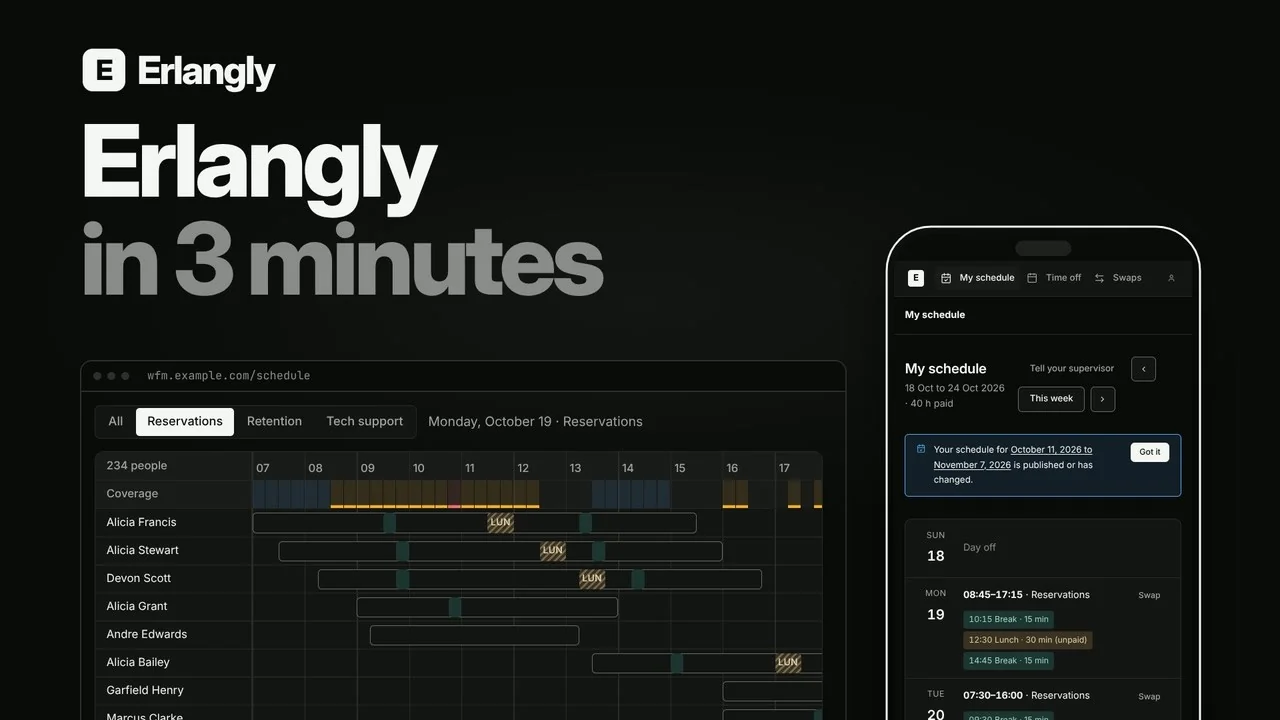
Every 15 or 30 minutes forecast and staffed with Erlang C, to match your ACD
Seconds to schedule 500 agents, with breaks and lunches placed
12 countries of labor law built in: hours and overtime, and rest and breaks where the law sets them
6 ACDs connected directly, and any other through the API
Forecasting · Erlang C staffing · Scheduling
From history to a published schedule, and then to the floor.
The whole job in one place, built for call centers, contact centers and BPOs, including those running several clients and lines of business, with agents dedicated to one or shared across them.

Forecast
Import interval history by CSV or API. Erlangly forecasts contacts and handle time for each line of business, and you adjust what you know better.
Staff
Erlang C for calls, concurrency for chat, workload for email: how many agents each interval needs to hit your service level, or the agents your client asks for, with shrinkage.
Schedule
Generate weeks of shifts, breaks and lunches from your shift patterns, contracts, availability and time off. Edit by hand, compare drafts, publish, and look at one team at a time.
Follow the law
Rest, hours and break law for the US, Canada, India, Jamaica, Kenya, the Philippines, Panama, South Africa, Barbados, Belize, Guyana, and Trinidad and Tobago, checked whenever shifts change. A rule set to block stops the change; a warning needs your OK.
Agents, on a phone or at their desk
Agents see their week, ask for time off, swap shifts with a colleague and say they've seen a new schedule, in any browser. Supervisors approve.
Adherence, live
Your ACD sends agent states; Erlangly scores adherence every interval against the published schedule and shows the floor on a wallboard. Intraday sets each day beside the forecast.
Real-time adherence
Your ACD, live on the wallboard.
Erlangly connects directly to Genesys Cloud, NICE CXone, Five9, Amazon Connect, Zoom Contact Center and Twilio Flex, and only reads. Any other ACD sends its agents' states to the API, or a spreadsheet of them to an import.
Every interval, adherence is scored against the published schedule, and the wallboard shows the whole floor, or one team: who's doing what, for how long, and what their schedule says.

Who it's for
One app for the whole floor.
Planners
Forecast each line of business, staff it with Erlang C, generate and publish the schedule, and keep it current.
Supervisors
The wallboard and Intraday, time off, swaps and exceptions, and your team's adherence through the day.
Agents
Their schedule, time off and shift swaps, on a phone or a computer, in any browser, and a notification on their phone when it changes. Nothing to install.
IT
One command to install, single sign-on, backups and exports, and upgrades that roll back if they fail.
BPO workforce management
Every client, on one install.
Outsourcers run work for several clients with one roster of people. Each client gets its own lines of business, schedules and time zone, its contact data stays on your server, and labor law for 12 countries is built in, from Jamaica to the Philippines. An in-house contact center has one client and never sees any of this.
Each client kept apart
Lines of business, schedule periods and published schedules for each client, in its own time zone. Two clients can each have a BILLING.
Agents shared across clients
People can work for several clients, one shift at a time. Scheduling one client works around their shifts for the others, with rest either side.
Planners see their clients
An admin can limit planners and supervisors to the clients they work for: on every page, in downloads and through the API.
Adherence by client
The adherence download names each row's client, ready for billing and for the reports your clients ask for.
Self-hosted WFM software
Your server, your data.
Erlangly is one Docker container on a server you choose: a cloud server, a machine in your office or a virtual machine. One command installs it, and one upgrades it, with a snapshot first and an automatic rollback.
Your IT team gets single sign-on with Microsoft Entra ID, Okta or Google Workspace, and an audit trail of who changed what. Your own scripts and AI agents get a JSON API and a command line, with your roles and permissions.
$ curl -fsSL https://get.erlangly.com | sh
Installing Docker…
Installing the erlangly command…
Erlangly is running at http://wfm.example.com  (installed in 75 s)

$ sudo erlangly upgrade   # a snapshot first, rolled back if it fails
It stays on your server
Your agents' details, your schedules and your clients' contact data never pass through ours, and there's no telemetry.
You decide what leaves
Email, backups and sign-in go to services you choose. Your server only calls us for a daily version check, and you can turn that off.
Nothing held hostage
Pay once, and it runs for good. If a yearly plan ends, Erlangly carries on under the free plan. Nothing is deleted or locked away.
Take it with you
Export everything as CSV files whenever you like, from Settings or with one command on the server.
Pricing · Perpetual or yearly licenses
Buy it once, and it's yours.
Most workforce management software is rented by the month, for as long as you use it. Erlangly you can own. Every plan has every feature, single sign-on included, and for 100 agents over three years it's about a quarter of what the leading WFM suites cost at list price.
Free
Pay once
Yearly
Questions
Is it really free for up to 25 agents?
Yes, for good, with every feature, single sign-on included. Supervisors, planners and admins who sign in but aren't on the roster don't count. Want to try it with your whole floor? A 30-day trial has no agent limit.
What do I need to run it?
A Linux server running Ubuntu or Debian, on x86-64 or ARM64. 2 processor cores and 2 GB of memory run a floor of up to 500 agents, like a small cloud server, with 20 to 80 GB of disk for a year of your floor's data. One command installs it.
Which ACDs does it work with?
Genesys Cloud, NICE CXone, Five9, Amazon Connect, Zoom Contact Center and Twilio Flex connect directly, and only read. Any other ACD sends its agents' states through the API, and volume history comes in by CSV import.
Does it work for remote and on-site agents?
Yes, and for a mix of both. Agents see their schedule, ask for time off and swap shifts from a phone or a computer, wherever they work, as long as they can reach your install. Each person has their own time zone and can follow the labor law where they work: their site's, or their own when they work from home somewhere else. Adherence comes from your ACD, so it's scored the same at home as on the floor.
Can it run on a server without internet access?
Once it's installed, yes. License keys are checked on the server itself, a server that can't reach the internet is activated with typed codes, and the daily version check can be turned off.
How does licensing work?
Pay $299 an agent once and it's yours for good, with the first year of updates and rule packs included, or pay $12 an agent a month, billed yearly. If a yearly plan ends, Erlangly carries on under the free plan, and nothing is deleted. The pricing page has the details.
Is there a cloud version?
Not yet. Hosted Erlangly, where we run it for you, is coming later.
Free tools
Not ready to install? Start here.
Erlang C calculator
Work out the agents you need from calls, handle time and service level, with shrinkage, for voice and chat. Free and online.
Call center schedule template
A free shift and break schedule for Excel and Google Sheets: agents, interval forecasts, time off, and shifts with breaks, in 15 or 30-minute intervals.
Try it on your own server
Free for up to 25 agents, for good, or a 30-day trial with no agent limit.