Schedule adherence
Adherence is how much of their scheduled time people spent doing what the published schedule asked: on the phone when they were scheduled to take contacts, on a break when it was their break, and so on. Erlangly scores it every 15 minutes from the agent states your ACD sends. To see who's in or out of adherence right now, use the wallboard.
What it needs
- A published schedule. See Scheduling.
- Agent states from your ACD. A connected ACD sends them as they change. Without a connection, you can import a file of state changes or of logins and logouts, with Import a file on a connection's page.
- Agents linked and codes mapped. Each person needs their ACD agent ID, on their page or in the people import. Direct connections link agents by email the first time. Your ACD's state codes need mapping to Erlangly's states on the connection's page.
How adherence is scored
A minute after each 15-minute interval closes, so late events still count, Erlangly compares each person's states in it with what the published schedule asked for:
- Scheduled on the phone (their shift, outside breaks and other activities): Available, On a call or After-call work is in adherence.
- A break or lunch: Break.
- Training: Aux with the reason Training. Coaching: Aux with Training or Admin. Admin and meetings: Aux with Admin or Meeting.
- Time off, and approved exceptions like sick or late: Logged off.
Any other state is out of adherence. Time with no state from the ACD is No ACD data, which counts neither way, and time nobody was scheduled isn't scored at all.
adherence = time in adherence ÷ (time in adherence + time out of adherence)
From a file of logins and logouts, being logged in counts as in adherence when someone was scheduled to work, and out when they were scheduled off. It can't say what they did on a break, so their breaks and other activities count as no ACD data rather than against them.
Exceptions
An exception is what someone did instead of their schedule: sick, late, absent, voluntary time off, overtime, or an unplanned meeting.
- Agents tell their supervisor from My schedule, and supervisors approve them under Requests → Exceptions. Supervisors can record one too, including from an agent's tile on the wallboard when they're out of adherence.
- Exceptions a supervisor records for someone else count at once, as do short ones of a type with an auto-approve limit, set under Settings → Exceptions.
- An approved exception replaces the schedule for its time. Someone off sick isn't out of adherence for being logged off, and overtime counts as time on the phone. Approving one scores those intervals again.
The adherence report
Wallboard → Adherence report shows adherence over the days you choose, by person, team or line of business, lowest first, so you see who needs a look.
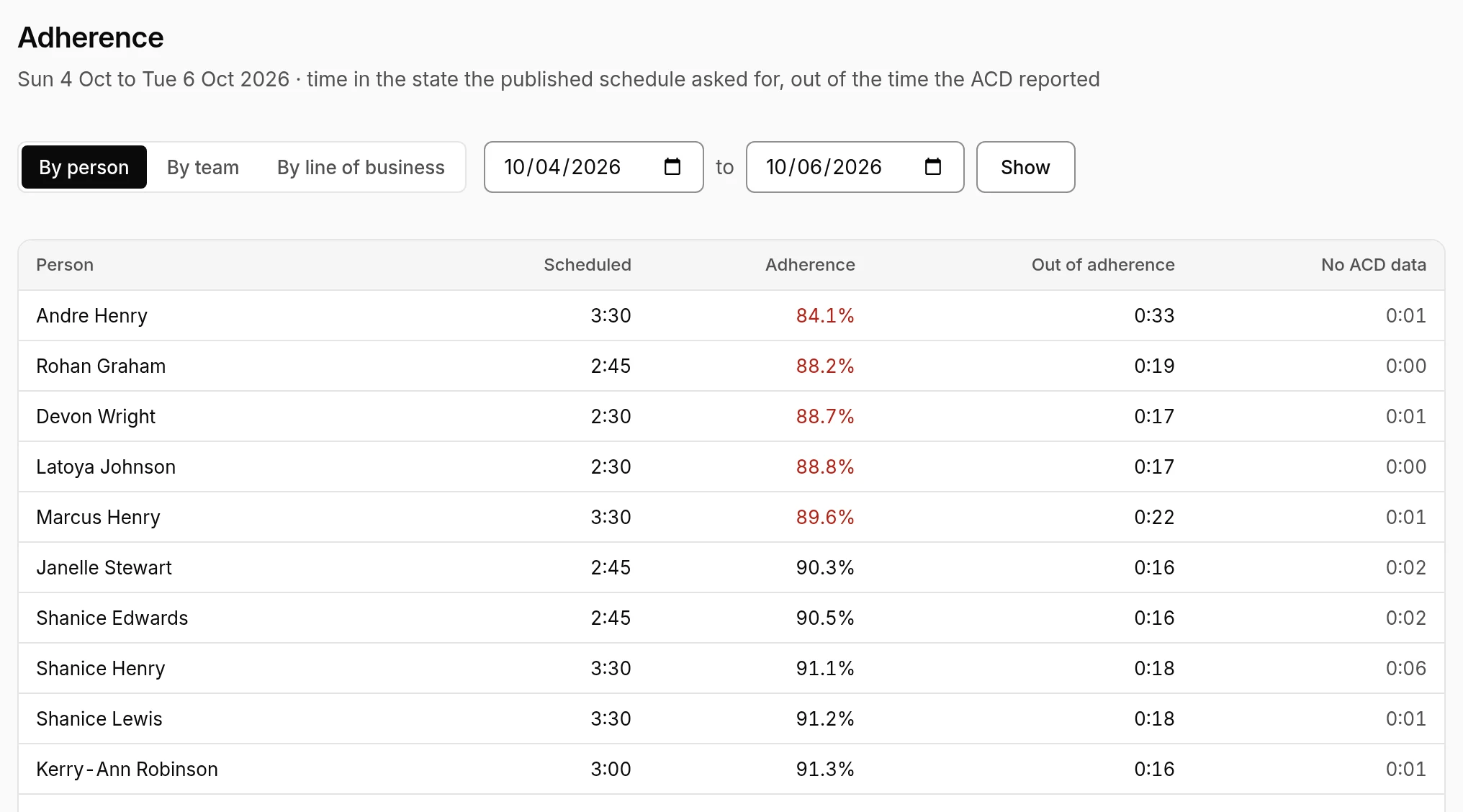
- Scheduled: the time the published schedule asked for.
- Adherence: in red under 90%.
- Out of adherence and No ACD data: the time behind the figure.
Each interval counts for the line of business of the shift it fell in.
Approximate adherence
Some ACDs only report time in each state per interval, not each change of state. Import those summaries with Import a file on a connection's page. Erlangly matches each interval's time in each state to what the schedule asked for. It can't tell when in the interval each state was, so those figures are marked ≈ (approximate). Days when someone has state changes of their own are scored from those instead.