Intraday
What it does: shows how the floor did against the plan, interval by interval. You get the contacts forecast and the contacts that came, handle time, service level against its target, answer rate and abandons, and the agents needed, scheduled and on the phones, with how busy they were and how well they kept to the time scheduled on the phones. It covers one line of business or all of them, for a day or up to 31 days.
Use it when: you check how today is going, look back at yesterday or last week, or look for the times of day where the forecast or the staffing misses.
You need
- A published forecast for the days. See Forecasting and staffing.
- Actual contacts, from a connected ACD or imported. For answer rate and service level, also how many were answered, and how many within the target time. The connected ACDs that read volumes give both: Zoom against each queue's own threshold, the others against your target. Otherwise import them or send them through the API.
- A published schedule, for the agents scheduled. See Scheduling.
- Agent states from your ACD, for agents on the phones, occupancy and adherence.
You get
- A summary of the days, then each day, then each time of day across the days, and every interval when you want it.
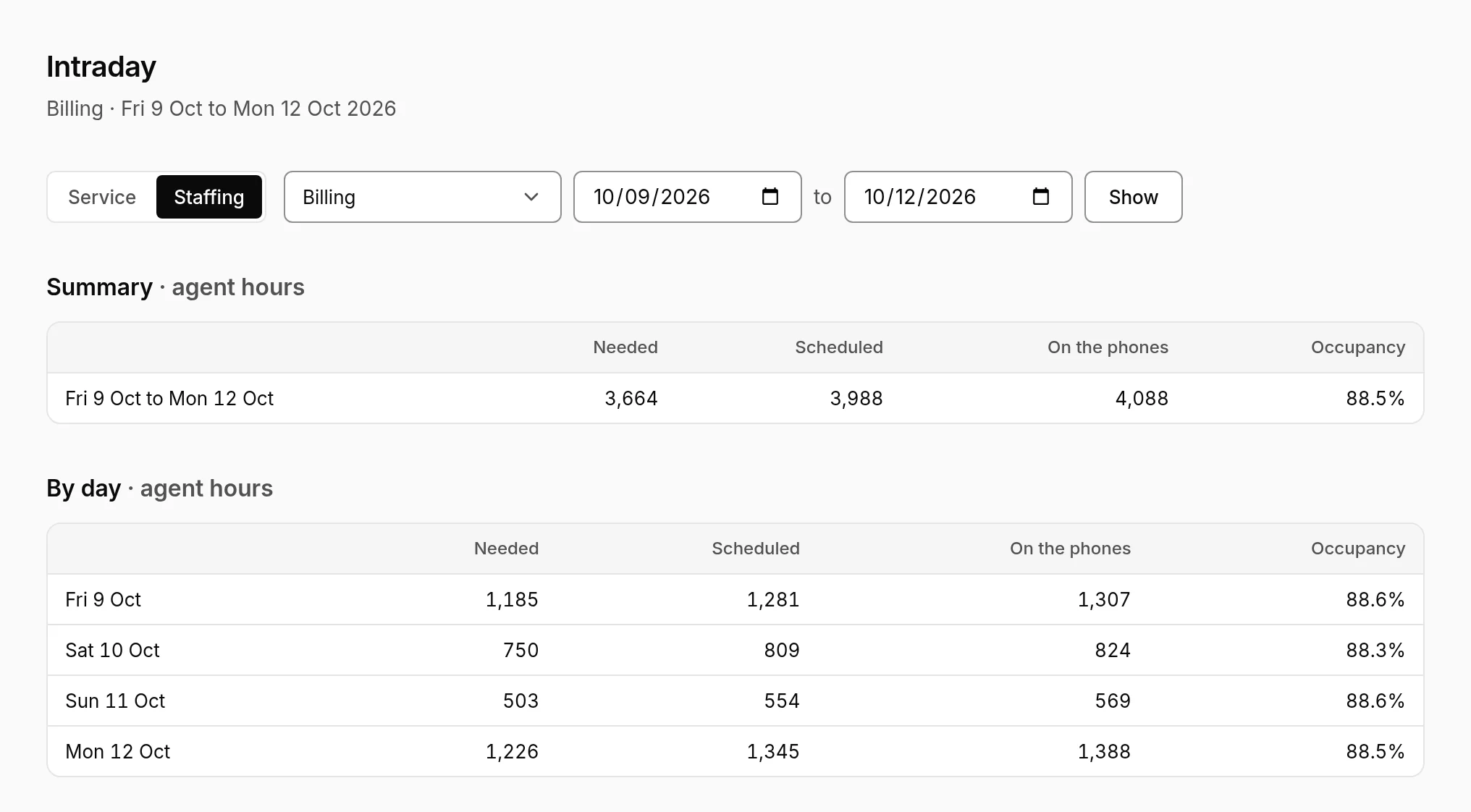
- A Service tab for contacts, handle time, service level, answer rate and abandons, and a Staffing tab for agents, occupancy and adherence while scheduled on the phones.
- An Hours tab: where the hours planned went, step by step, down to the hours on the phones.
Open it
- Open Intraday. It opens on today, for all lines of business.
- Choose a line of business and the dates, up to 31 days, then Show.
- Switch between Service, Staffing and Hours at the top.
Check the day
- Contacts against the forecast. A time of day that's over or under every day says the forecast's shape is off there: look at it by time of day over a week or two.
- Handle time. Longer than forecast needs more agents for the same contacts.
- Abandons. How many, and their share of the contacts.
- On the phones against needed. Shown in red where fewer were on the phones than needed, over the intervals that have closed.
- Scheduled against on the phones. Where many more were scheduled than were on the phones, people weren't there when scheduled: see Schedule adherence.
- Occupancy. How busy the people on the phones were. Very high for long stretches wears people out; low means more on the phones than the contacts needed.
- Adherence while scheduled on the phones. How much of the time people were scheduled to take contacts they were available, on a call or in after-call work. Out of adherence there is time the floor lost: see who in Schedule adherence.
What it shows
The sections
| Section | What it is |
|---|---|
| Summary | The dates chosen, in one row. |
| By day | A row a day, when there's more than one. |
| By time of day | Each interval of the day across the days, so every 09:00 together. For one day, its intervals. |
| Every interval | Each interval of each day, under Show every interval. |
Intervals with nothing in them are left out: nothing forecast, needed, scheduled or on the phones, and no contacts.
The figures
| Figure | How it's worked out |
|---|---|
| Forecast contacts and handle time | The live forecast: the published forecasts, with their overrides. |
| Actual contacts, handle time and abandons | What your ACD or your imports sent. Handle time is averaged over the contacts. |
| Service level | The contacts answered within the target time, out of what the line's service target measures it over: the contacts offered, those answered, or those offered less short abandons, as the client's contract says. Red where it's under the target. Not per interval for email and tickets planned to their response time. |
| Expected service level (≈) | Where nothing says how many were answered within the target time, for calls: what Erlang C says the agents on the phones for the line should have given that interval's contacts and handle time, within its target time. It's an estimate from the same maths as the agents needed, not what callers got, and a measured figure always shows instead when there is one. Chat, email and tickets aren't planned with Erlang C, so they have none. |
| Answer rate | The contacts answered, out of the contacts offered. |
| Needed | The agents on the phone the forecast needs to meet the service target, before shrinkage, as on the forecast's page. |
| Scheduled | People on the phone in the published schedule: their shifts, less breaks, lunches, other activities off the phone and time off. |
| On the phones | Time available, on a call or in after-call work, from the agent states your ACD sends. Each person counts on the line of business of the shift they're on, otherwise on their only one. |
| Occupancy | Time on a call or in after-call work, out of the time on the phones. |
| In adherence and out of adherence | Of the time people were scheduled on the phones, the time they were available, on a call or in after-call work, and the time they weren't. Scheduled as the adherence report has it: shifts less breaks, lunches, other activities off the phone and time off, with exceptions such as overtime or a late start. Time with no state from the ACD is neither. |
| Adherence | In adherence, out of the time in and out of adherence. |
Staffing is in agent hours in the summary and by day, and in agents, on average over the interval, by time of day and for every interval.
Today, the intervals still to come show the forecast, needed and scheduled. Actual contacts arrive within about 15 minutes, and the line under the title says up to when. On the phones counts each interval once it has closed.
The Hours tab
From the hours planned to the hours on the phones, for the days and line of business chosen, over the intervals scored so far. Each step has its hours and a bar from the total before it to the total after it: what takes hours away in red, what adds them in green.
| Step | What it is |
|---|---|
| Hours planned | The published shifts. A day of time off keeps its shift, so time away shows as the next step. |
| Less time away | Approved time off over the shifts, by type: vacation, sick leave and so on. |
| Less exceptions | Approved exceptions over the shifts, by type: late, sick, absent and so on. |
| Less activities off the phone | Breaks, lunches, training, meetings and the other activities planned off the phone, by type. |
| Not on the phones while scheduled on them | Of the time left scheduled on the phones, the time people weren't available, on a call or in after-call work, or that the ACD said nothing about. |
| Overtime | Approved overtime outside the shifts. |
| On the phones while scheduled otherwise, or not scheduled | The rest of the time on the phones: during a break or meeting, or outside a shift. |
| Hours on the phones | Available, on a call or in after-call work, from the agent states your ACD sends. |
The schedule is the one the adherence report scores against, and the steps always add up to the hours on the phones.
Common issues
| You see | Why, and what to do |
|---|---|
| On the phones shows a dash for some days | Erlangly hasn't tallied their agent states yet. It fills in the states it kept from before, a day at a time every 15 minutes, newest first. Or no ACD was sending states then. |
| Actual contacts show a dash | No contacts have come in for those intervals yet. Check your ACD's connection page, or import the volumes. |
| Needed shows a dash | No published forecast covers those days, or the forecast has no handle time. |
| Service level shows a dash, or ≈ | Nothing said how many were answered within the target time. For calls, ≈ shows the expected service level instead, once the agent states for the interval are in. Not every connected ACD counts it: import it with your volumes (answered_in_target), or send it through the API. A target measured over the contacts answered needs answered too, and one that leaves out short abandons needs short_abandons. |
| The Hours tab says nothing has been scored | The hours start from the first interval scored. Choose days that have begun, with a published schedule. |
| Adherence shows a dash for some days | Those intervals were scored before Erlangly kept adherence for the time on the phones on its own. Intervals scored since have it, and so do states you import again. |
| A longer range stops after 31 days | Intraday shows up to 31 days at a time. |
Terms used here
| Term | In Erlangly |
|---|---|
| On the phones | Available, on a call or in after-call work. |
| Occupancy | On a call or in after-call work, out of the time on the phones. |
| Agent hours | Agents times hours: 4 agents over a 15-minute interval make one agent hour. |
Next step
For the floor right now, see the wallboard. For who followed their schedule, see Schedule adherence. To take what you learn into the next forecast, see After the day.