How forecasts and staffing are calculated
How Erlangly forecasts each interval's contacts and handle time from your history, works out the agents they need on calls, chats and email, and adds shrinkage, with the settings each step uses. Forecasting and staffing has the steps.
The forecast
Each interval is forecast from the same weekday and time in recent weeks, recent weeks counting more. With the default weighting of 30, 25, 20, 10, 10 and 5, if the last six Mondays at 09:00 had 110, 100, 90, 80, 70 and 60 contacts (newest first), next Monday at 09:00 is forecast at 94:
(30 × 110 + 25 × 100 + 20 × 90 + 10 × 80 + 10 × 70 + 5 × 60) ÷ 100 = 94
| Rule | What happens |
|---|---|
| Handle time | Averaged the same way, weighted by contacts, so busy intervals count for more than quiet ones. |
| Public holidays in the history | Left out, from the labour law your organisation follows, the rule pack's and your own: the next older week is used. |
| Days with no contacts at all | Left out, like an outage or missing data: the next older week is used. |
| Days you leave out | Left out under Volume history, for outages, spikes and one-off days: the next older week is used. |
| A time with no contacts on a day that has some, when other weeks are busy then | Taken for an outage or missing data: that week is left out of that time only, and the forecast says so. A time other weeks are quiet at counts as none. |
| Today | Not used until it's over: the history runs to yesterday. |
| The hour the clocks skip in spring | Left out of that week, as it has no contacts to count: the other weeks give that hour's figures. |
| Growth | Applied last: 94 with 10% growth is 103.4. |
| Less history than you asked for | It uses what there is, and says so. With none, the forecast is empty. |
| Special days | Applied to the calculated figures, and again on each recalculation. |
| Overrides | Win over the calculation and special days, and survive a recalculation. |
Agents needed
Each interval's agents come from the forecast's contacts and handle time, and the line of business's settings. How depends on the channel:
| Channel | How the agents are worked out | Settings it uses |
|---|---|---|
| Calls (and blended lines) | Erlang C: the fewest agents that answer your target share of calls within your target time, with agents no busier than your maximum occupancy. Whichever is stricter sets the number. | Service target, maximum occupancy |
| Chats | The work divided by what one agent carries (chats at a time × efficiency), plus a margin for chats arriving in bursts, then capped by maximum occupancy. The handle time is whole chat sessions, which every connected ACD reports; a spreadsheet's can be the agent's own time per chat instead, which isn't divided by the chats at a time. The service level shown is your target, not a prediction. | Service target, chats at a time, efficiency, maximum occupancy, handle time basis |
| Email and tickets, with opening hours | Each interval's work is spread over the intervals the line is open until it's due, by the response target. Work that arrives while it's closed waits for it to open, and work not done by closing carries over. Then it's capped by maximum occupancy. The day's intervals show what's still waiting at the end of each. | Response target, maximum occupancy, opening hours |
| Email and tickets, without opening hours | The work in the interval as it arrives: contacts × handle time ÷ the interval's length. | None |
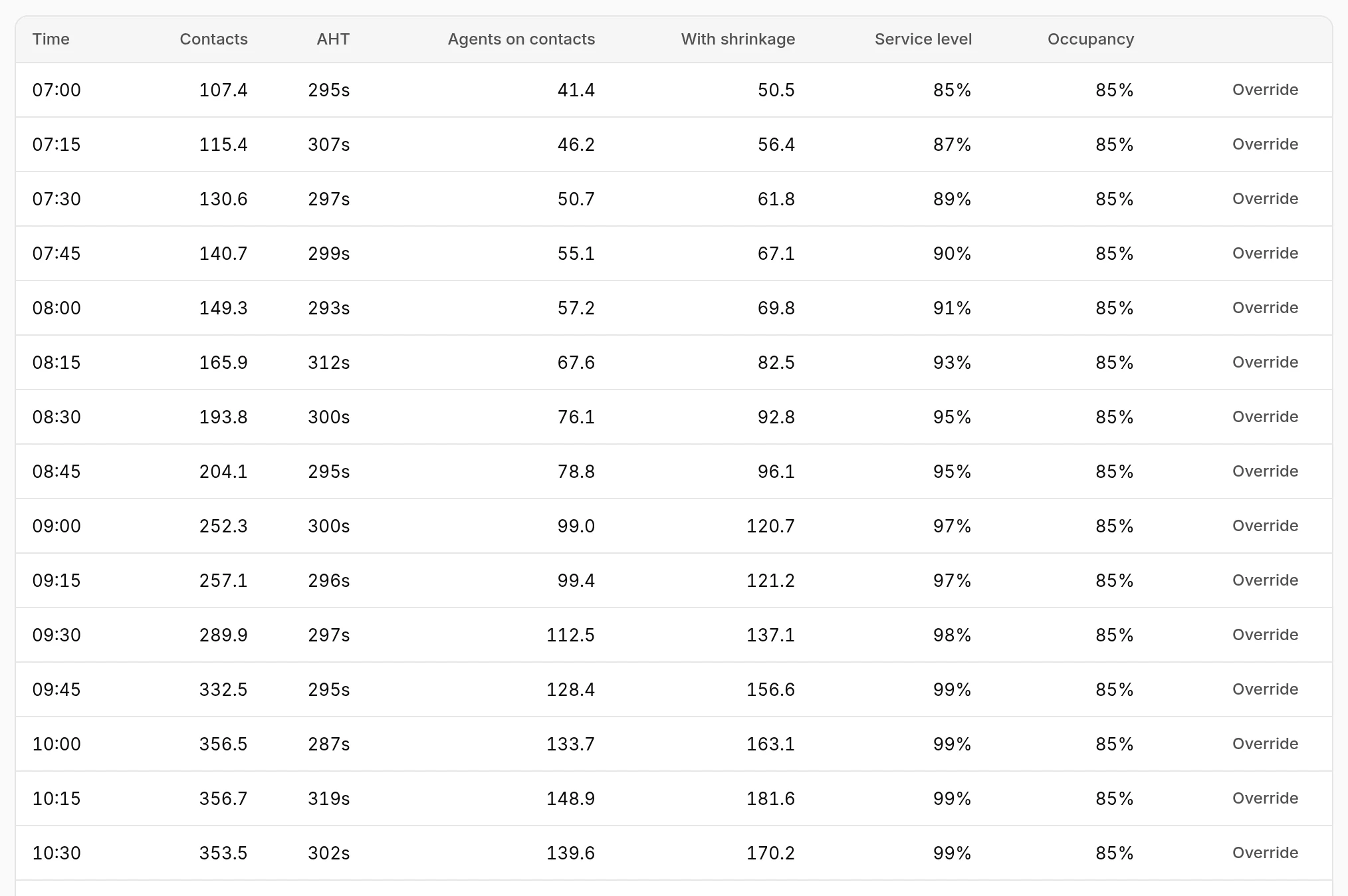
In the day above, service level runs at 90–99% while occupancy sits at its 85% limit: at Billing's volumes, the occupancy limit needs more agents than 80% in 20 seconds does.
Shrinkage
Shrinkage is time agents are paid for but not on contacts, in six categories: absence, termination, training, coaching and meetings, adherence, and other for anything else you track. They're the rows of Intraday's shrinkage against the plan. The categories are added up, and the agents on contacts grossed up once:
agents with shrinkage = agents on contacts ÷ (1 − shrinkage)
At 09:00 above, 99.0 agents on contacts become 120.7 with Billing's 18% shrinkage. Breaks aren't shrinkage: the schedule places them, and counting them here too would count them twice.
Service targets and shrinkage
Set them for each line of business under Settings → Lines of business, on the line's page. Each applies from the date you choose, so figures for days before it don't change.
On an email or ticket line's page, set its opening hours too: each weekday's opening and closing time, or around the clock. Its work is then planned to the response target within them. A chat line's page says what its handle time is: whole sessions from a connected ACD, or, for imported figures, the basis you choose when you edit the line.
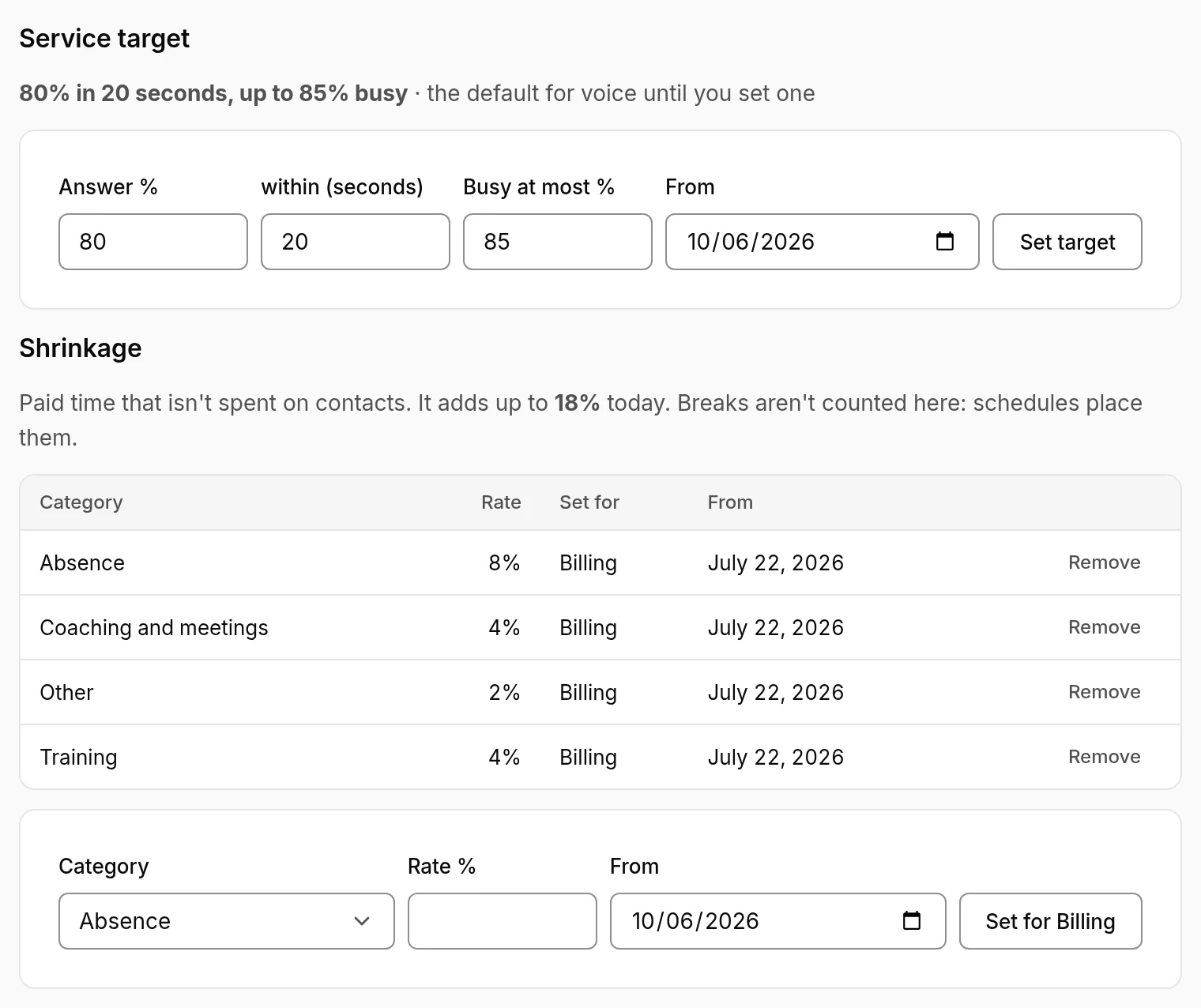
A service target also says how its service level is measured, as the client's contract does: the contacts answered within the target time out of the contacts offered (the default), out of the contacts answered, or out of the contacts offered, less short abandons (those abandoned within the seconds you set). It changes the service level Intraday shows, not how many agents are planned.
Line adherence, for a contract that measures it, is set on the same target: tick it, then give the share of needed productive an interval's productive agents must reach (and, if the contract has one, a ceiling), the share of intervals that must pass, and how long a measured interval is, such as 30 minutes. A new target starts from the one in force. Intraday's Staffing then shows each interval passed or missed, and the share passed. Lines whose contracts don't measure it leave it unticked.
Until you set them, a line of business uses its channel's defaults:
| Channel | Service target | Also |
|---|---|---|
| Calls | 80% answered in 20 seconds | Agents up to 85% busy |
| Chats | 80% in 60 seconds | 3 chats at a time, 85% efficiency, up to 85% busy |
| Email and tickets | 90% within a day | Up to 85% busy, once the line has opening hours |